How to Digitize Your Entire Wardrobe in Minutes
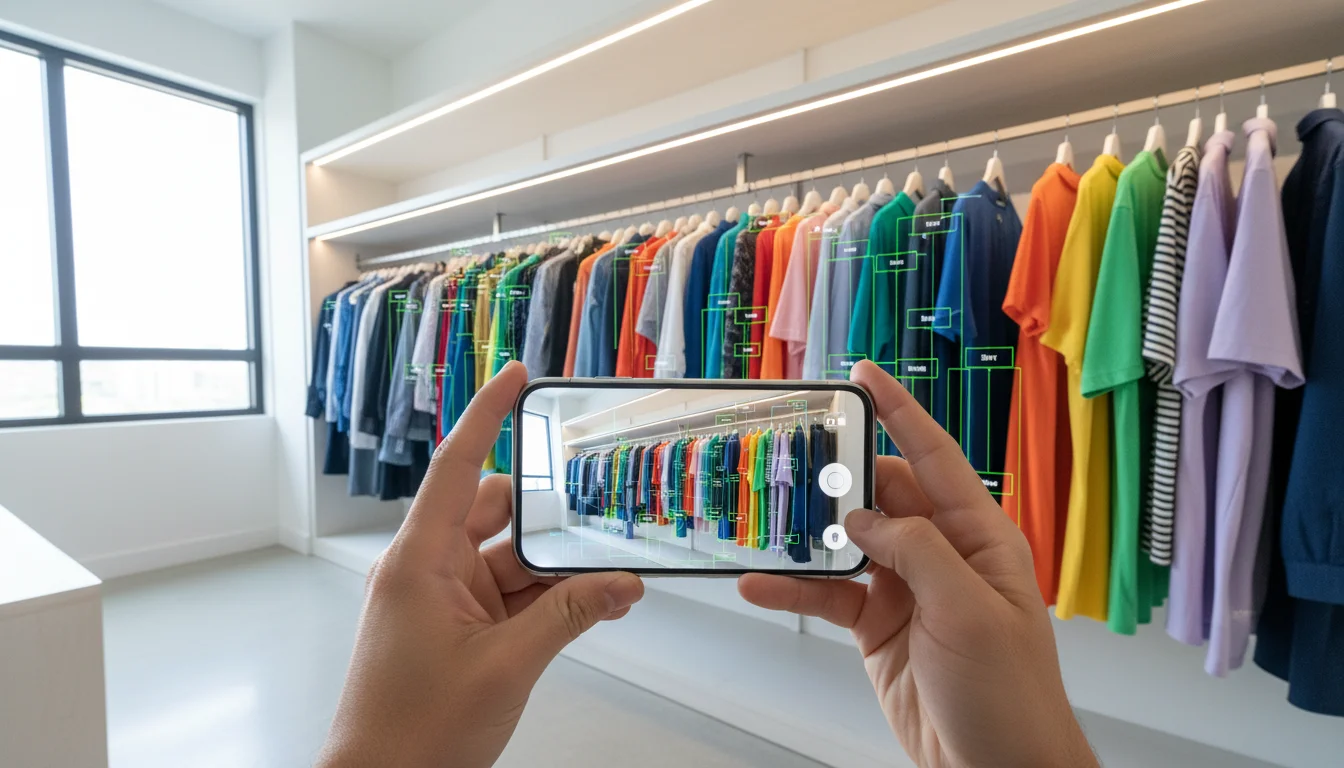
The biggest barrier to using a wardrobe app is the setup. Manually photographing every item in your closet, one by one, is tedious enough to kill motivation before you even start. The average wardrobe contains roughly 100 to 150 items - photographing each one individually takes two to three hours. That is why most wardrobe apps have abysmal retention rates: people add 20 items, get exhausted, and never open the app again.
FitInView's wardrobe scanner was built to remove this barrier entirely. Instead of photographing items one by one, you film your hanging clothes with a slow pan of your phone camera, and the AI does the rest - identifying individual garments, removing backgrounds, categorizing each item, and adding it to your digital wardrobe automatically. You can digitize your entire wardrobe in minutes, not hours.
How the Wardrobe Scanner Works

The scanner is accessible from the main FitInView app or directly at scanner.fitinview.com on any device with a camera. Here is the step-by-step process:
Step 1: Open the Scanner
Navigate to the scanner from the FitInView dashboard or go directly to scanner.fitinview.com in your phone's browser. The scanner works on any modern smartphone, tablet, or laptop with a camera. No app download is required - it runs in your browser.
Step 2: Film Your Hanging Clothes
Point your phone at one section of your closet and slowly pan from left to right. Keep the camera about an arm's length from the clothes. The scanner captures frames from the video stream in real time, looking for distinct garment boundaries.
Step 3: AI Detection and Processing
As you pan, the AI works in the background to identify individual garments, separate overlapping items, and remove the background (closet rod, hangers, wall). Each detected item gets processed through a categorization pipeline that determines:
- Category - shirt, pants, dress, jacket, sweater, coat, skirt, shorts, etc.
- Subcategory - t-shirt vs. dress shirt vs. polo, slim jeans vs. wide-leg trousers, etc.
- Primary and secondary colors - the AI detects dominant and accent colors from the garment image
- Pattern - solid, striped, plaid, floral, printed, textured
- Season suitability - summer, winter, transitional, or all-season based on fabric weight and style
- Style tags - casual, formal, sporty, streetwear, business, bohemian, etc.
- Fabric estimation - based on visual cues like sheen, texture, and drape
Step 4: Review and Confirm
After scanning, you see all detected items in a review grid. Each item shows the background-removed photo, the AI-assigned category, colors, and tags. You can accept items, reject false detections (a hanger or non-clothing item), correct any miscategorizations, or merge duplicates if the scanner captured the same item from different angles.
Step 5: Repeat for Other Sections
Scan one rod or closet section at a time. After hanging clothes, move to any additional rods, shelves, or closet areas. For folded items in drawers, switch to the individual photo capture mode - take a quick photo of each folded item. The AI processes individual photos the same way, with automatic background removal and categorization.
Tips for Getting the Best Scanning Results
The scanner's AI is robust, but the quality of your video directly affects results. Here are proven tips from users who have scanned thousands of items:
- Space garments slightly apart on the rod - even a centimeter of gap helps the AI distinguish boundaries between items
- Use good lighting - natural daylight or a bright overhead light (at least 300 lux). The scanner relies on visual quality, and dim closets produce less accurate color detection. Open closet doors fully and turn on nearby room lights
- Pan slowly and steadily - quick movements produce blurry frames that the AI struggles to parse. Aim for about one garment per second of panning, roughly 30 seconds for a standard closet rod of 30 items
- Hold the camera at chest height pointing slightly downward - this angle captures the full garment from shoulder to hem
- Do one rod or shelf at a time rather than trying to capture everything in a single continuous sweep
- For folded items in drawers and on shelves, unfold the top portion so the AI can see the neckline and color, or use individual photo capture
- Remove dry-cleaning bags and garment covers before scanning - the plastic confuses the AI's fabric and color detection
- If you have very dense closet sections, pull out a few items temporarily to create space between garments
How the AI Categorization Technology Works
Behind the scanner is a multi-stage AI pipeline. The first stage uses computer vision to detect garment boundaries in the video frames - separating one shirt from the next even when they are hanging close together. The second stage removes the background, isolating just the garment against a clean white canvas.
The third stage runs the isolated garment image through a classification model trained on millions of fashion images. This model identifies the garment category, subcategory, pattern, and style attributes simultaneously. The fourth stage uses color analysis to extract the dominant and secondary colors, mapping them to a standardized color palette for consistent searching and matching later.
The entire pipeline processes each garment in about one to two seconds. For a closet section of 30 hanging items, total processing time is typically under a minute after scanning.
After Scanning: What You Can Do With Your Digital Wardrobe
Once your wardrobe is digitized, every other FitInView feature comes alive. Here is what becomes available:
- Style Twin AI chat - the stylist now knows every item you own and can build real outfit suggestions from your actual wardrobe
- Daily outfit suggestions - morning recommendations based on your real clothes, the weather, and your calendar
- Outfit Builder - drag and drop your actual garments onto a flat-lay canvas to mix and match combinations
- Virtual try-on - see yourself wearing any item or outfit combination in a realistic preview
- Wardrobe analytics - see your wardrobe by category, color distribution, season coverage, and most-worn vs least-worn items
- Capsule wardrobe planning - the AI identifies your most versatile pieces and suggests minimal travel wardrobes
- Shopping with context - when you find something online, try it on virtually and see how it pairs with clothes you already own
The scanner is the foundation that makes every other feature useful. Without your wardrobe in the system, the AI is working blind. With your wardrobe scanned, it becomes a deeply personalized tool.
Keeping Your Digital Wardrobe Updated
After the initial scan, maintaining your digital wardrobe takes minimal effort. When you buy something new, snap a photo and the AI categorizes it instantly - a five-second task. When you donate, sell, or discard items, remove them from the app. Some users do a quick re-scan every season to catch any items they missed or to refresh the photos.
The goal is a living digital mirror of your real closet. When the digital wardrobe matches reality, every AI suggestion and every outfit plan is grounded in what you can actually wear today.
Common Questions About the Scanning Process
Users often wonder about edge cases. Here are answers to the most common concerns:
- Patterned items - The scanner handles patterns well, including stripes, plaids, florals, and graphic prints. It identifies the dominant color and pattern type.
- Dark closets - If your closet lacks lighting, open the doors fully and use a desk lamp or your phone's flashlight propped nearby. Alternatively, scan items in a well-lit room by hanging them on a door.
- Very large wardrobes (200+ items) - Scan in sections over multiple sessions. There is no limit to how many items you can add.
- Shoes and accessories - These work best with individual photo capture rather than the video scanner. Photograph each pair laid out against a plain background.
- Seasonal storage - Scan items before putting them in storage so they remain in your digital wardrobe year-round.
Related Posts
- How to Upload Your Clothes and Try Them On Virtually - Complete upload and try-on tutorial
- Best AI Wardrobe Apps in 2026 - How FitInView's scanner compares to other apps
- Smart Wardrobe App with Virtual Try-On - Full feature overview